

 (647) 478-5858
 (728) 500-4818
Imagine this scenario playing out on your phone right now. You just spent thousands of dollars on a highly targeted advertising campaign. A potential customer sees your product on social media. They love the product. They click the link with their credit card ready. Then they wait. One second passes. Two seconds pass. The screen remains completely blank. By the third second, they lose interest, hit the back button, and likely go purchase a similar item from your biggest competitor.
You did all the hard work to win the click, but you lost the sale because of a technical delay you cannot even see. Page speed is not just an IT problem for tech nerds to worry about. It is a direct revenue metric that impacts your bottom line every single hour of the day. If your digital storefront takes too long to unlock the front door, customers will simply walk away. In this guide, we are going to break down exactly why your e-commerce site is bleeding money in the background and precisely how you can plug the leak to start capturing those lost sales.
How Much Money Is Your E-commerce Site Losing Every Second?
Business owners often look at traffic numbers and assume everything is fine. You might have ten thousand visitors a month. However, if those visitors are abandoning the page before the product images even appear, that traffic is completely useless. Let us look at the hard math behind load times and online revenue. Consumers today have zero patience. They have been trained by massive tech companies to expect instant gratification. When your independent store fails to deliver that instant experience, trust drops immediately.
Understanding the Drop-Off Rate On Your E-commerce Site
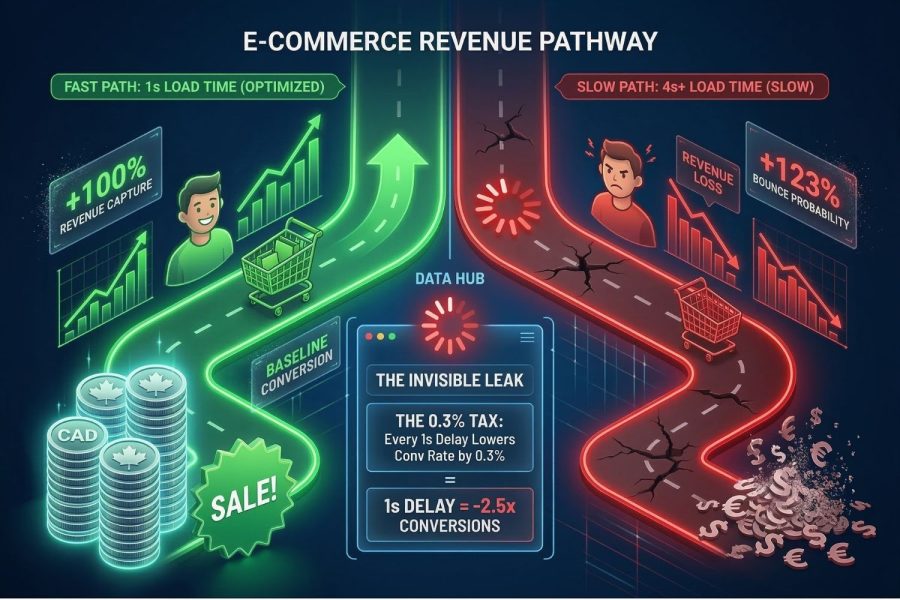
The numbers do not lie. Data collected by the Baymard Institute statistics on cart abandonment shows that a massive percentage of shoppers leave items behind simply because the checkout process takes too long to process. The difference between a one-second load time and a three-second load time can literally cut your total sales in half. It is one of the most vital metrics you can monitor.
| E-commerce Site Load Time | Average Conversion Rate | Customer Bounce Probability |
|---|---|---|
| Under 1 Second | 3.05% to 4.00% | Extremely Low |
| 1 to 2 Seconds | 1.68% to 2.00% | Increases by 32% |
| 2 to 3 Seconds | 1.12% to 1.50% | Increases by 106% |
| Over 4 Seconds | Less than 1.00% | Increases by over 120% |
The Mobile Shopper Reality For Your E-commerce Site
You also have to consider where these customers are shopping. Most people are not sitting at a desk with a high-speed wired internet connection. They are on the subway, in a coffee shop, or walking down the street using a cellular network. If your store is not optimized for these conditions, you are effectively turning away the majority of your potential buyers.
Why Phones Struggle With Heavy E-commerce Site Pages
Mobile phones have less processing power than desktop computers. When you force a smartphone to download massive files, the device literally chokes on the data. Here are the main reasons mobile devices struggle:
- Weak cellular signals cause data packets to drop.
- Older smartphone processors cannot handle heavy code execution.
- Large screen resolutions force the phone to resize massive images on the fly.
- Battery saving modes naturally slow down web browsing speeds.
What Exactly Happens Before Your E-commerce Site Shows Up?
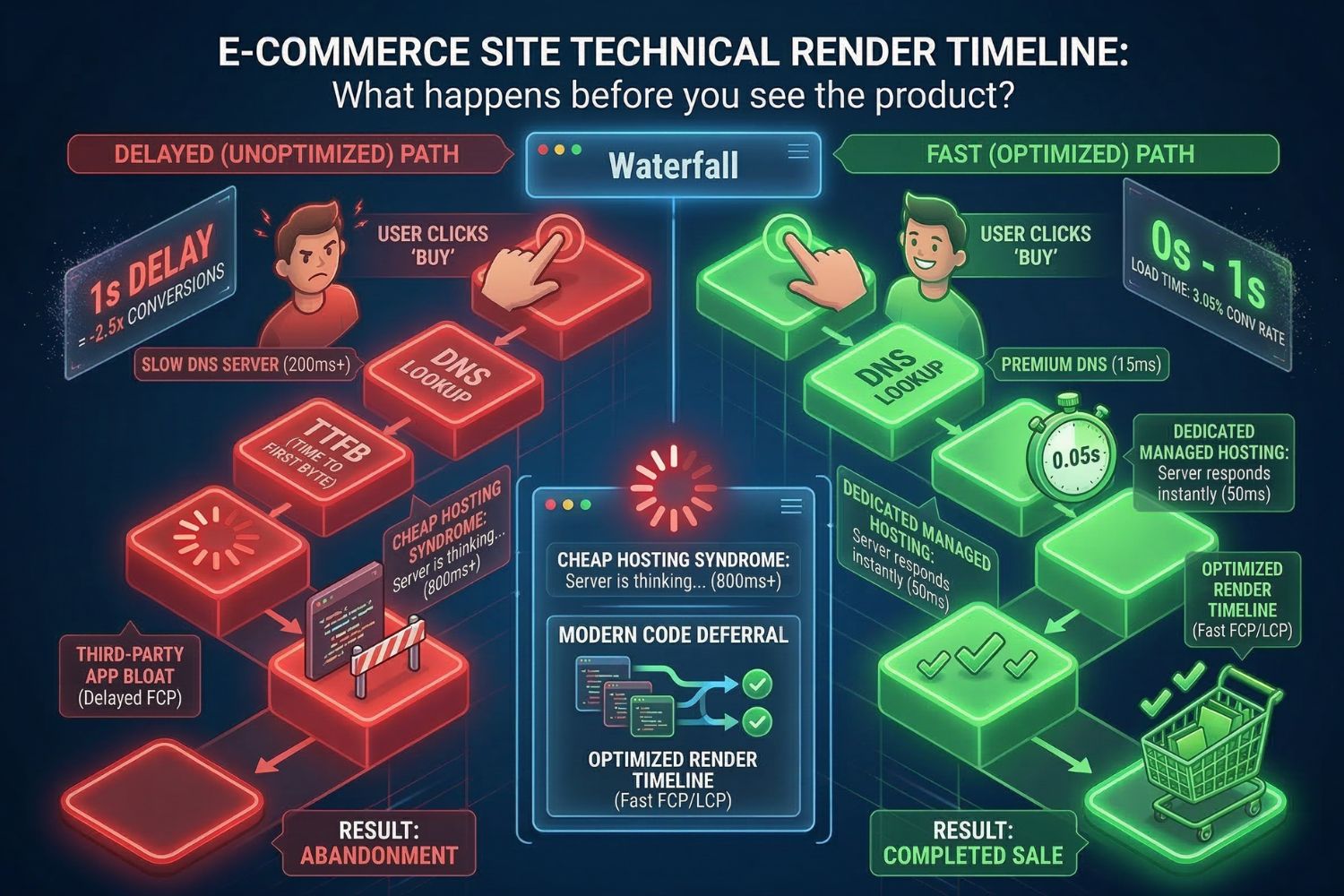
To fix the problem, you have to understand the invisible process that happens in the background. When a user clicks your link, the website does not just magically appear all at once. There is a complex conversation happening between the customer’s phone and the server where your files are stored. If any part of this conversation is delayed, the customer is left staring at a white screen.
The Invisible Loading Process Explained For Your E-commerce Site
Think of this process like ordering a meal at a restaurant. The waiter takes your order to the kitchen, the chefs have to find the ingredients, they cook the meal, and then the waiter brings it back to your table. If the kitchen is disorganized, your food will be late.
| Technical E-commerce Site Term | Simple Explanation | Ideal Target Speed |
|---|---|---|
| DNS Lookup | The browser finding your server address. | Under 20 milliseconds |
| Time To First Byte (TTFB) | The server thinking about the request before replying. | Under 200 milliseconds |
| First Contentful Paint (FCP) | The very first piece of text or color appearing on screen. | Under 1.0 second |
| Largest Contentful Paint (LCP) | The main product image finally loading. | Under 2.5 seconds |
Server Response Times And Your E-commerce Site
The biggest hidden factor is the server itself. Many business owners opt for the cheapest hosting plan available to save a few dollars a month. This is a massive mistake. Cheap hosting means you are sharing a server with thousands of other websites. When those other sites get busy, your store slows down to a crawl.
Key Factors Affecting E-commerce Site Servers
If your server is acting sluggish, it is usually due to a few specific bottlenecks that need to be addressed by a professional.
- Physical distance between the server location and the actual shopper.
- Lack of dedicated memory allocated to your specific store.
- Outdated database versions that take too long to search for products.
- Poor security configurations force the server to work harder than necessary.
Why Are Customers Abandoning Your E-commerce Site So Fast?
We know the technical reasons pages load slowly, but we also need to understand the psychological reasons people leave. Shopping is an emotional experience. When a customer decides they want to buy a pair of shoes or a piece of software, they get a small hit of dopamine. A slow website acts like a bucket of cold water on that excitement. It breaks the spell. If you want to learn more about user behavior, we highly recommend reading our guide on proven ways to keep visitors on your website.

The Core Reasons Shoppers Leave An E-commerce Site
Trust is fragile on the internet. If a website feels broken, customers immediately worry about the security of their credit card information. A laggy interface makes your entire brand look amateur and untrustworthy.
| Customer Experience On E-commerce Site | Psychological Reaction | Result For Your Business |
|---|---|---|
| Page is blank for 3 seconds | Confusion and loss of interest | User hits the back button to find a competitor |
| Buttons jump around while loading | Frustration and fear of clicking the wrong thing | User abandons the cart entirely |
| Images load piece by piece slowly | Perception that the brand is cheap | User loses desire for the premium product |
The Frustration Of Rage Clicking On Your E-commerce Site
Have you ever tapped an “Add to Cart” button and nothing happened? What did you do next? You probably tapped it three or four more times in rapid succession out of pure annoyance. In the web development world, this is known as a rage click. It is a clear indicator that your store is failing the user experience test.
Preventing Poor Interactions On Your E-commerce Site
Google actually measures this frustration now. They track how quickly your page responds to a user tapping the screen. To stop people from leaving in a state of annoyance, you must ensure the following elements are lightning fast:
- The mobile menu expanding instantly when tapped.
- Product variations updating immediately when a new color is selected.
- The shopping cart sliding out without any visual stuttering.
- Checkout forms validating email addresses in real time without reloading the page.
Which Elements Are Slowing Down Your E-commerce Site?
Now that we understand the stakes, we need to identify the culprits. What is actually making your digital storefront so heavy? Most business owners unknowingly sabotage their own stores by adding too many bells and whistles. Every single feature you add to your page comes with a weight penalty. If you add too much weight, the car cannot move forward.
The Hidden Speed Killers On An E-commerce Site
The most common offenders are usually the things you added to try to boost sales. It is a terrible irony. You install a pop-up to collect emails, but that pop-up script is so heavy that the customer leaves before they even see the discount offer.
| Feature On E-commerce Site | Impact On Page Speed | Alternative Solution |
|---|---|---|
| Customer Review Widgets | Very High (Loads external scripts) | Hard-code reviews directly into the page template. |
| Live Chat Applications | High (Constant server pinging) | Delay loading the chat until the user scrolls down. |
| Large Promotional Banners | Medium (Heavy image files) | Use modern web image formats instead of standard JPEGs. |
| Social Media Feeds | High (Pulls data from outside networks) | Remove the live feed and link to social profiles directly. |
Third-Party Apps And Your E-commerce Site
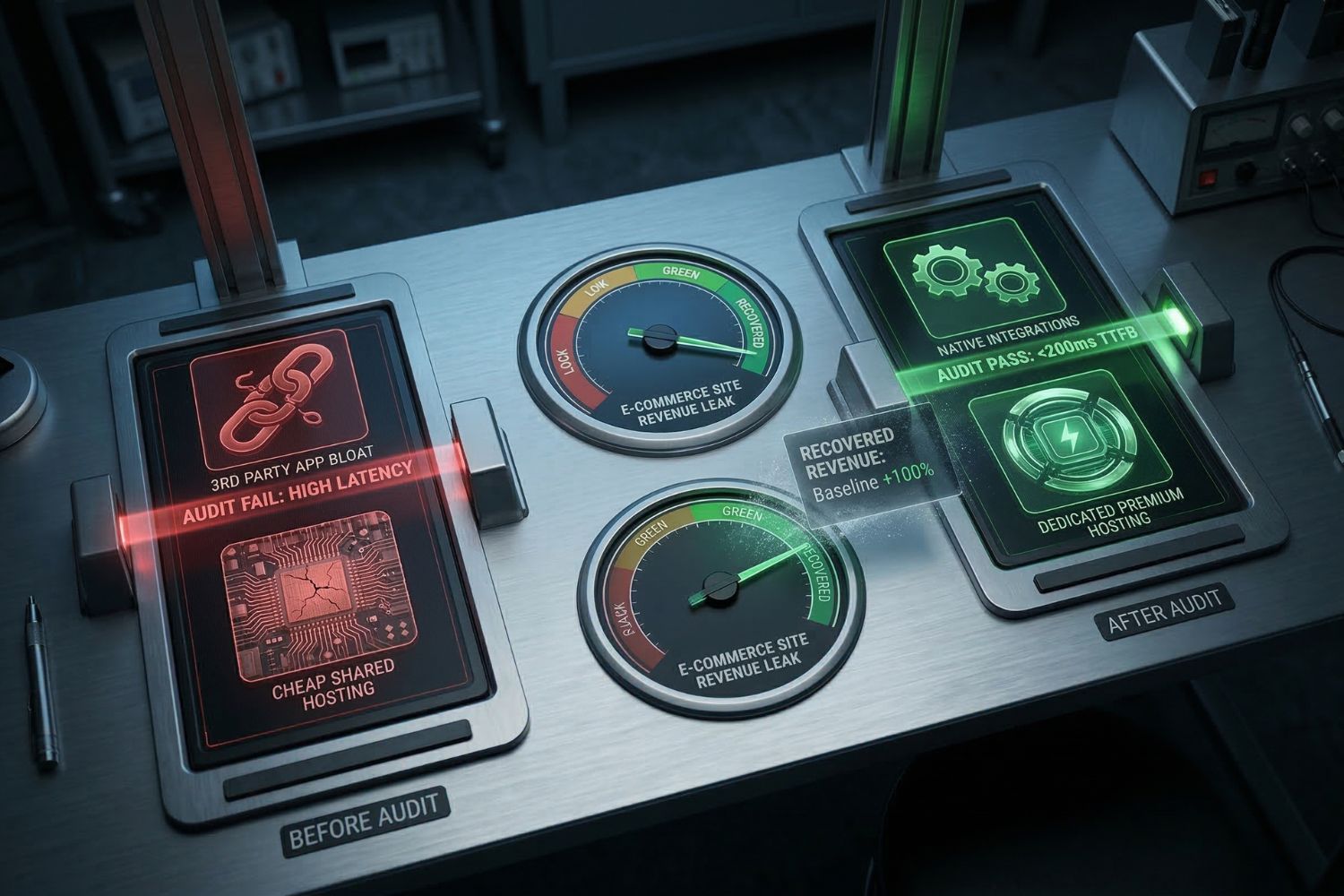
If you use popular platforms, you likely rely on an app store to add features. While these tools are convenient, they are disastrous for performance. Every time a customer loads your page, their browser has to fetch data from your server, and then fetch data from the review app server, and then fetch data from the shipping calculator server. It creates a massive traffic jam. You can read up on how platforms are trying to fix this in our breakdown of Shopify’s latest features.
Evaluating Your E-commerce Site Plugin Stack
You need to be ruthless with your extensions. Ask yourself if a feature is actually making you money, or if it is just a gimmick. We recommend conducting a regular audit of your tools:
- Delete any apps that you are currently paying for but rarely check.
- Consolidate tools by finding one app that does the job of three separate apps.
- Ask your developer to build custom functions instead of renting heavy plugins.
- Remove tracking pixels for advertising platforms you no longer actively use.
How Can You Fix Your E-commerce Site Speed Today?
Awareness is the first step, but action is what actually recovers your lost revenue. The good news is that almost all of these technical issues are completely fixable. You do not need to delete your entire catalog or strip your brand of its personality. You just need to organize the code properly so the browser knows what to prioritize.
Actionable Steps For A Faster E-commerce Site
There are steps you can take today on your own, and there are steps that require a professional touch. Compressing your images is something you can manage, but rewriting server configurations requires expert help.
| Speed Optimization Strategy | Required Skill Level | Expected Impact On E-commerce Site |
|---|---|---|
| Compressing product images | Beginner | Immediate improvement in visual load times. |
| Removing unused tracking codes | Intermediate | Reduces background processing delays. |
| Implementing lazy loading | Advanced | Stops off screen images from slowing down the top of the page. |
| Code minification and deferral | Expert | Massive improvement in time to interactive metrics. |
Upgrading Your E-commerce Site Hosting Environment
The foundation of a fast store is a robust server. If you are serious about online sales, you must graduate from basic shared hosting. Moving to a dedicated cloud environment or utilizing a powerful Content Delivery Network guarantees that a shopper in another country gets the same lightning-fast experience as a shopper in your home city. This is highly tied to your search rankings, which we discuss deeply in our article on why mobile SEO matters.
Working With Professional Developers For Your E-commerce Site
Eventually, the DIY methods will only take you so far. When you are ready to stop losing sales and start dominating your market, you need a team that understands the deep technical architecture of digital retail. This is where strategic coding comes into play. By leveraging custom e-commerce website development solutions, you can strip away the bloated template code and build a streamlined, conversion-focused machine that loads instantly and keeps customers happily checking out.
- Custom builds eliminate the need for bloated third-party applications.
- Professional developers properly structure the loading sequence for maximum speed.
- Expert teams optimize the database queries so product searches happen instantly.
- Dedicated agencies provide ongoing monitoring to ensure speed never drops as you grow.
How To Test Your Current E-commerce Site Performance?
You cannot fix what you do not measure. Before you make any major changes, you need to establish a baseline. Do not just load the page on your own computer and assume it is fast. Your computer has already saved the images in its cache. You need to see the data through the eyes of a brand-new visitor.
The Best Testing Tools For Your E-commerce Site
There are free resources available that will give you a detailed report card on your current performance. These tools will pinpoint exactly which images are too big and which scripts are blocking the page from appearing.
| Diagnostic Tool | Best Used For | Cost For E-commerce Site Owners |
|---|---|---|
| Google PageSpeed Insights | Checking Core Web Vitals and mobile compliance. | Completely Free |
| GTmetrix | Viewing the waterfall chart of how files load in order. | Free basic tier |
| Pingdom Speed Test | Testing server response times from different global locations. | Free basic tier |
Taking The Next Step For Your E-commerce Site
Run your store through Google PageSpeed Insights right now. If your mobile score is in the red zone, you are actively losing money every single day. Do not panic, but do take immediate action. Start by cleaning up your image files, removing old plugins, and evaluating your current hosting situation. The faster you make your digital storefront, the faster your revenue will grow.
Frequently Asked Questions About E-commerce Site Speed
Business owners always have specific concerns when it comes to upgrading their digital infrastructure. We have compiled the most common questions we hear regarding online store performance.
What is a good load time for an e-commerce site?
The golden rule in modern digital retail is that your pages must visually load in under two seconds. However, the top-performing stores aim for under one second to guarantee the absolute highest conversion rates possible. Every fraction of a second you can shave off will positively impact your sales numbers.
Does my e-commerce site’s speed actually affect Google rankings?
Yes, it absolutely does. Google has officially stated that user experience metrics are a major ranking factor. If your store is slow, visitors will bounce back to the search results. Google notices this behavior and will actively demote your listings, pushing your competitors above you in the search rankings.
Will fixing my e-commerce site speed break my current design?
No, professional speed optimization happens entirely in the background. The code is restructured, images are compressed, and servers are upgraded without altering the visual appearance of your brand. Your store will look exactly the same to the customer, it will simply appear on their screen much faster.
Can I just compress my images to fix my e-commerce site?
Image compression is an excellent starting point and will certainly help, but it is rarely a complete solution. If your server is slow or your theme code is bloated, small images will not solve the underlying technical bottlenecks. True performance optimization requires looking at the entire technical stack from top to bottom.
How often should I test my e-commerce site’s performance?
You should run a full diagnostic test at least once a month. Furthermore, you should immediately test the speed anytime you install a new feature, upload a large batch of new product photos, or change any of the tracking codes in your marketing campaigns. Constant vigilance is the only way to maintain peak performance.